What the checklist is for
Partner portal and PRM demos tend to look alike: a branded login, a resource library and a deal form. The differences that cost money later sit underneath, in how deals sync with the CRM, which plan includes MDF, and how partner users are counted. A requirements checklist fixes those questions before the first demo.
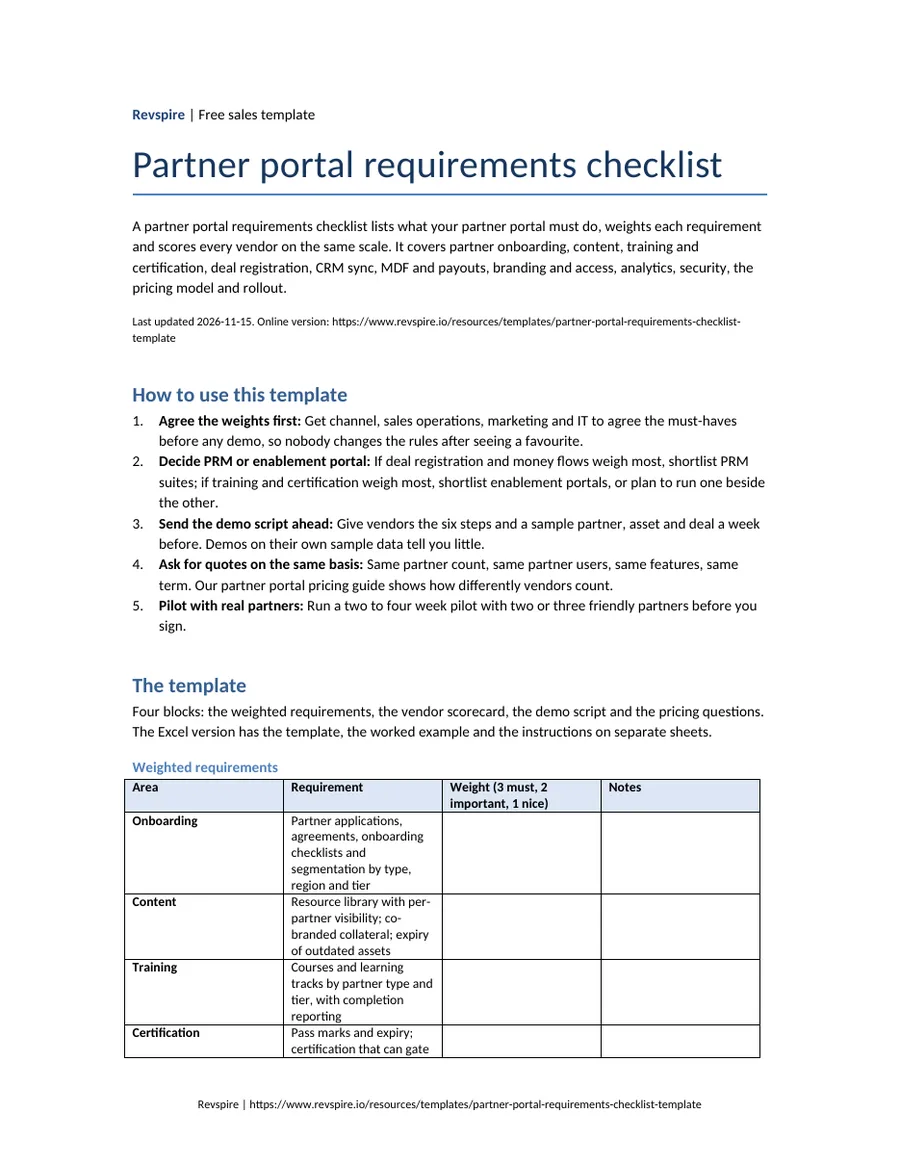
The template has four parts: the weighted requirements, a scorecard with one column per vendor, a demo script that asks every vendor to show the same things on your programme, and the pricing questions that make quotes comparable.
It works for both halves of the market. Full PRM suites are judged on deal registration, money flows and CRM sync; enablement portals are judged on training, certification and content. Weighting the areas tells you which half your programme needs before you compare vendors.
When to use a partner portal requirements checklist
- You are launching a partner programme and choosing your first portal.
- Partners outgrew a shared drive, a spreadsheet or a CRM community page.
- You are deciding between a full PRM and an enablement portal.
- Channel, sales operations, marketing and IT need to agree on one decision.
- Procurement asks for a documented comparison before signing.
Checklist, RFP or pilot
Three ways to evaluate a partner portal, often used in sequence. This template covers the first and feeds the other two.
| Method | What it gives you | When to use it | What it does not do |
|---|---|---|---|
| Requirements checklist | A weighted list and a scorecard per vendor | At the start, to shortlist | Prove the portal works for your partners |
| RFP | Written answers and a formal quote from each vendor | When procurement requires it | Show how partners experience the portal |
| Pilot | Real use by a few partners on your content and deals | With the final one or two vendors | Compare many vendors cheaply |
The template
Four blocks: the weighted requirements, the vendor scorecard, the demo script and the pricing questions. The Excel version has the template, the worked example and the instructions on separate sheets.
Weighted requirements
| Area | Requirement | Weight (3 must, 2 important, 1 nice) | Notes |
|---|---|---|---|
| Onboarding | Partner applications, agreements, onboarding checklists and segmentation by type, region and tier | ||
| Content | Resource library with per-partner visibility; co-branded collateral; expiry of outdated assets | ||
| Training | Courses and learning tracks by partner type and tier, with completion reporting | ||
| Certification | Pass marks and expiry; certification that can gate tier status or deal registration | ||
| Deal registration | Registration form, approval workflow and duplicate or conflict rules | ||
| Lead distribution | Routing leads to partners by region, tier or specialism | ||
| CRM sync | Two-way sync of partners, registered deals and leads with your CRM, on the plan you will buy | ||
| Money flows | MDF requests and approvals, rebates, commissions and payouts | ||
| Branding and access | Co-branded or white-label portal, single sign-on, company-level roles so a partner admin manages its own staff | ||
| Analytics | Partner-sourced pipeline by partner and tier, training completion, content use; partner-facing dashboards | ||
| Security | Data location, partner data separation, access reviews and the documentation your security team needs | ||
| Rollout | Time to the first partners live, migration of existing partners and content, support model |
Vendor scorecard (score 0 to 3 per requirement)
| Requirement | Vendor A | Vendor B | Vendor C |
|---|---|---|---|
| Onboarding | |||
| Content and co-branding | |||
| Training and certification | |||
| Deal registration | |||
| CRM sync | |||
| Money flows | |||
| Analytics | |||
| Weighted total |
Demo script (ask every vendor to show the same things)
| Step | What to ask them to show |
|---|---|
| 1 | Onboard a new reseller company, invite two of its staff and give its admin control of its own users. |
| 2 | Publish a co-branded asset that only one partner tier can see. |
| 3 | Assign a training track and show the certification a partner must pass before registering deals. |
| 4 | Register a deal, trigger a duplicate conflict and show the approved deal arriving in our CRM. |
| 5 | Raise and approve an MDF request, if we run MDF. |
| 6 | Show the report a channel leader would use each month: pipeline, certification and content use by partner. |
Pricing questions
| Question | Why it matters |
|---|---|
| How do you count partners and partner users: per member, per partner company, per active partner or per module? | The model changes the bill more than the entry price as the programme grows. |
| Which plan includes deal registration, CRM sync and MDF? | Several vendors keep them above the entry plan. |
| Are training, certification and co-branding included or add-ons? | Readiness features are often priced separately. |
| What are the implementation, migration and support fees? | They can be a large share of year one. |
| How do we export partners, deals, content and training history if we leave? | Your programme data should leave with you. |
Prefer a file? We email the Word, Excel and PDF versions to your work address, free.
Email me the filesA worked example
Example: fictional company
One vendor's weighted scorecard for three portals. The point is how the weights, not the demos, decide the shortlist.
Harborview Metrics sells through 35 resellers that register deals but rarely pass certification. The channel lead weighted training and certification, deal registration and CRM sync as must-haves and scored three vendors after scripted demos.
Harborview Metrics: weighted scorecard
| Requirement (weight) | Vendor A | Vendor B | Vendor C |
|---|---|---|---|
| Training and certification (3) | 1 | 3 | 2 |
| Deal registration (3) | 3 | 1 | 3 |
| CRM sync (3) | 2 | 2 | 3 |
| Content and co-branding (2) | 2 | 3 | 2 |
| Money flows (1) | 3 | 0 | 2 |
| Weighted total | 25 | 24 | 30 |
Example: fictional company. Ferncastle Analytics, Harborview Metrics, Marlow & Finch Logistics and every person named in this example are invented for illustration. Any resemblance to real companies or people is coincidental.
How to run the evaluation
Agree the weights first
Get channel, sales operations, marketing and IT to agree the must-haves before any demo, so nobody changes the rules after seeing a favourite.
Decide PRM or enablement portal
If deal registration and money flows weigh most, shortlist PRM suites; if training and certification weigh most, shortlist enablement portals, or plan to run one beside the other.
Send the demo script ahead
Give vendors the six steps and a sample partner, asset and deal a week before. Demos on their own sample data tell you little.
Ask for quotes on the same basis
Same partner count, same partner users, same features, same term. Our partner portal pricing guide shows how differently vendors count.
Pilot with real partners
Run a two to four week pilot with two or three friendly partners before you sign.
Where partner portal evaluations go wrong
Comparing entry prices
A low per-member price can cost more than a module price once every partner user needs a login.
Missing the plan boundary
Deal registration, CRM sync or MDF on a higher plan than the one you were quoted.
Buying PRM for a readiness problem
If partners sign up but do not sell, deal plumbing will not fix it; training and certification will.
Forgetting the partners
If partners find the portal slow, they will not log in. Include them in the pilot.
No exit plan
Check that partners, deals and training history can be exported before you sign.
Where Revspire fits
Most PRM suites cover deal registration, money flows and CRM sync well and leave partner readiness to a separate learning tool.
The Revspire Partner Portal gives channel partners training tracks, role-plays and certifications in one place, alongside the governed content, playbooks and deal rooms each tier should see, with unlimited user licenses. Deal registration, MDF and payouts are not among its listed capabilities, so programmes that need them run them in a PRM or the CRM beside it.
Partner portal requirements checklist FAQs
What should be on a partner portal requirements checklist?
Partner onboarding, content and co-branding, training and certification, deal registration, lead distribution, CRM sync, money flows such as MDF and payouts, branding and access, analytics, security, the pricing model and rollout, each with a weight agreed before any demo.
What is the difference between partner portal and PRM requirements?
Portal requirements describe what partners see and do: login, content, training and deal forms. PRM requirements describe the system behind it: partner records, tiers, deal conflict rules, money flows and CRM sync. Weight both, then shortlist the type of product that matches your highest weights.
How do you compare partner portal vendors fairly?
Send every vendor the same demo script and a sample partner, asset and deal, score each requirement straight after the demo, and ask for quotes on the same partner count, partner users, features and term.
Should we pilot a partner portal before buying?
Yes, with the final one or two vendors: two to four weeks with two or three friendly partners shows how the portal works for the people who have to use it.
Related templates and reading
- Free templateSales call scorecard templateA weighted 1-5 rubric for scoring recorded calls on agenda, discovery, value messaging, objections, next steps and talk/listen balance.
- Free templateSDR onboarding plan templateA week-by-week ramp plan for SDRs and BDRs: ICP, messaging, sequences, cold calls, qualification and the first qualified meeting, with gates.
- Free template30-60-90 day sales onboarding plan templateA 30-60-90 day sales onboarding plan for new account executives: goals, activities, milestones and manager checkpoints for each phase, ending in a first closed-won deal.
- Free templateSales coaching templateOne skill per rep per cycle, the evidence behind it and the date it is reviewed, so coaching survives more than one conversation.
- Blog: 15 partner portal tools comparedBest partner portal software
- Guide: what partner portal and PRM vendors chargePartner portal pricing
- Template: tiers, onboarding and certification once you choosePartner enablement plan template
- Blog: training and readiness tools for partnersBest partner enablement software
- Glossary: what a partner portal isPartner portal glossary entry