What a customer onboarding checklist is for
B2B onboarding involves several people on both sides and runs for weeks, so steps get lost between sales, implementation, customer success and the customer's own team. A checklist makes each step visible, gives it an owner and defines when it is finished.
The template follows six phases: handoff from sales, kickoff, setup and configuration, training, go-live, and first value. Each phase ends with exit criteria, which stop a project from drifting into go-live before data is connected or users are trained.
First value is the phase most checklists leave out. Going live is your milestone; the customer's milestone is the first time the product does what they bought it for. Writing that moment down at kickoff, in the customer's words, gives onboarding a finish line both sides recognise.
When to use the checklist
- For every new B2B or SaaS customer, from the day the contract is signed.
- When a customer adds a new team, region or product that needs its own setup.
- When onboarding moves between people, such as from sales to an implementation lead.
- As the agenda for weekly onboarding calls with the customer.
- When reviewing why some customers take much longer to go live than others.
Onboarding checklist, onboarding plan or success plan
Three documents that customers often receive together.
| Document | What it is | Used for |
|---|---|---|
| Onboarding checklist | Every task to reach go-live and first value, with owners | Running onboarding week by week |
| Onboarding plan | The timeline, milestones and resources for onboarding | Agreeing the schedule at kickoff |
| Customer success plan | The customer's business goals and measures after go-live | Business reviews and renewal |
The checklist
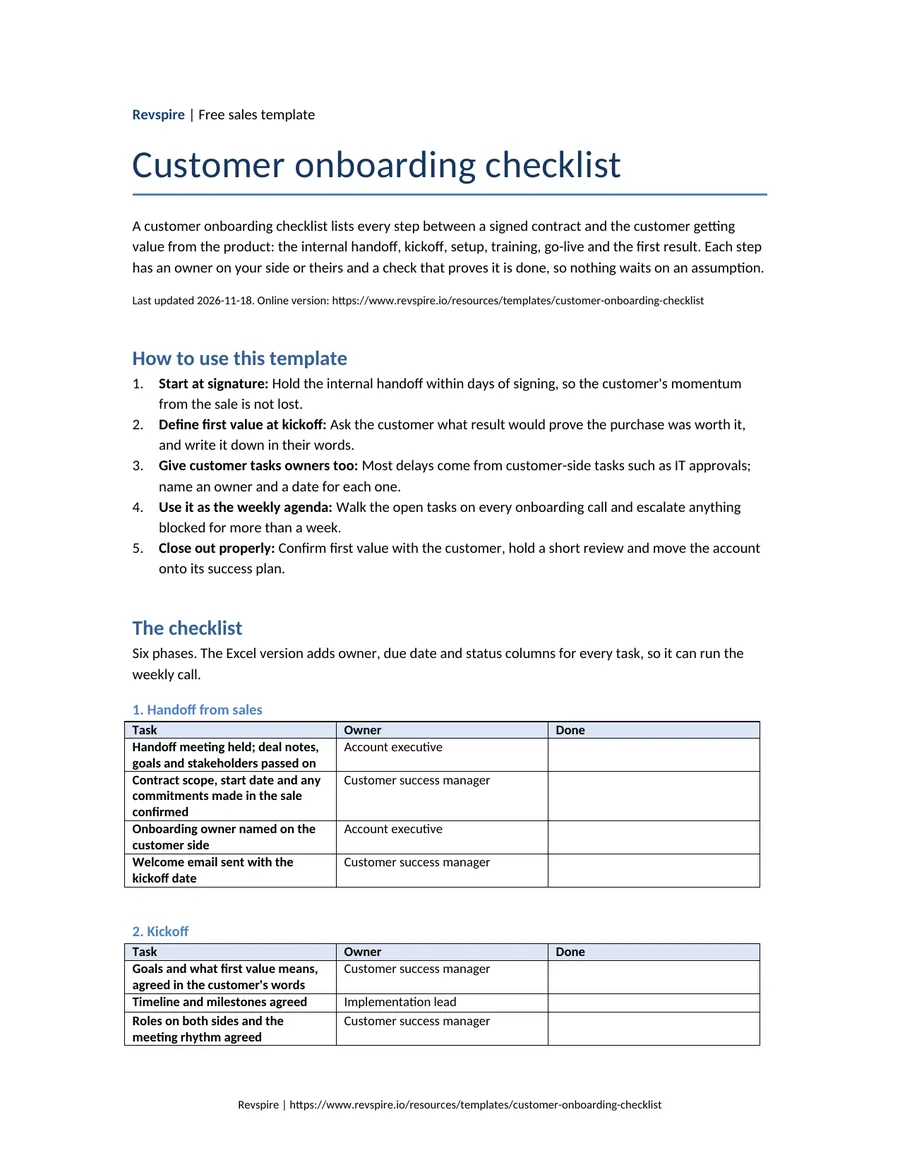
Six phases. The Excel version adds owner, due date and status columns for every task, so it can run the weekly call.
1. Handoff from sales
| Task | Owner | Done |
|---|---|---|
| Handoff meeting held; deal notes, goals and stakeholders passed on | Account executive | |
| Contract scope, start date and any commitments made in the sale confirmed | Customer success manager | |
| Onboarding owner named on the customer side | Account executive | |
| Welcome email sent with the kickoff date | Customer success manager |
2. Kickoff
| Task | Owner | Done |
|---|---|---|
| Goals and what first value means, agreed in the customer's words | Customer success manager | |
| Timeline and milestones agreed | Implementation lead | |
| Roles on both sides and the meeting rhythm agreed | Customer success manager | |
| Technical contacts and access requirements listed | Customer IT lead |
3. Setup and configuration
| Task | Owner | Done |
|---|---|---|
| Accounts, single sign-on and permissions set up | Customer IT lead | |
| Integrations connected and data tested | Implementation lead | |
| Content, templates or settings configured | Implementation lead | |
| Security or compliance review completed if required | Customer IT lead |
4. Training
| Task | Owner | Done |
|---|---|---|
| Admin training completed | Implementation lead | |
| End-user training scheduled and delivered by role | Customer success manager | |
| Help materials and support route shared | Customer success manager |
5. Go-live
| Task | Owner | Done |
|---|---|---|
| Go-live date confirmed with the customer owner | Customer success manager | |
| First team live and using the product | Customer owner | |
| Issues from the first week logged and assigned | Implementation lead |
6. First value and close-out
| Task | Owner | Done |
|---|---|---|
| First value reached, as defined at kickoff, and confirmed by the customer | Customer success manager | |
| Onboarding review held: what went well, what to change | Customer success manager | |
| Customer success plan and first business review date agreed | Customer success manager |
Prefer a file? We email the Word, Excel and PDF versions to your work address, free.
Email me the filesA worked example
Example: fictional company
Exit criteria that stopped a premature go-live.
Harborview Metrics wanted to go live with Ferncastle Analytics' reporting product before its board meeting. At the weekly call, the onboarding lead walked the checklist with the customer's owner and found that two setup tasks were not done, which would have meant the board saw empty reports.
Harborview Metrics: status at the week-three call
| Phase | Status | Blocker | Decision |
|---|---|---|---|
| Handoff | Complete | ||
| Kickoff | Complete | First value: the board pack built from live data | |
| Setup | Two tasks open | CRM connection waiting on the customer's IT approval | Customer owner to escalate to IT this week |
| Training | Admin done; users scheduled | ||
| Go-live | Moved by one week | Depends on setup | Go live after data is tested, still before the board meeting |
Example: fictional company. Ferncastle Analytics, Harborview Metrics, Marlow & Finch Logistics and every person named in this example are invented for illustration. Any resemblance to real companies or people is coincidental.
How to run onboarding with the checklist
Start at signature
Hold the internal handoff within days of signing, so the customer's momentum from the sale is not lost.
Define first value at kickoff
Ask the customer what result would prove the purchase was worth it, and write it down in their words.
Give customer tasks owners too
Most delays come from customer-side tasks such as IT approvals; name an owner and a date for each one.
Use it as the weekly agenda
Walk the open tasks on every onboarding call and escalate anything blocked for more than a week.
Close out properly
Confirm first value with the customer, hold a short review and move the account onto its success plan.
Where onboarding goes wrong
Starting again after the sale
Asking the customer the same questions the seller already asked tells them nobody listened.
Go-live as the finish line
A customer who is live but has not seen value is still at risk.
Tasks with no owner
Customer-side tasks without a named person are the usual cause of delays.
Training once, for everyone
Admins and end users need different sessions at different times.
No review at the end
Without a short review, the same problems repeat with the next customer.
Where Revspire fits
Onboarding goes faster when the customer's team can see the plan and the materials in one place instead of searching email. A Revspire digital sales room gives each customer a shared space where the mutual action plan with owners and due dates can carry the onboarding tasks, next to training material, setup guides and the stakeholders from the sale.
Buyer engagement analytics show whether the customer's team has opened the training and setup material before each session, which is an early sign of a stalled onboarding.
Customer onboarding checklist FAQs
What should a customer onboarding checklist include?
The handoff from sales, kickoff with agreed goals, setup and integrations, training by role, go-live, and confirmation of first value, with an owner and a completion check for every task.
How long should B2B customer onboarding take?
It depends on the product and the customer's setup work. Agree a target date at kickoff based on the setup and training tasks, and track the customer-side tasks closely, because they cause most delays.
Who owns customer onboarding?
Usually a customer success manager or onboarding lead on the vendor side, with a named owner on the customer side. Sales owns the handoff, and an implementation lead owns technical setup.
What is the difference between onboarding and implementation?
Implementation is the technical setup: accounts, integrations and configuration. Onboarding is broader and includes the handoff, training, go-live and the customer reaching first value.
Related templates and reading
- Free templateMutual action plan templateA shared, dated plan from discovery to go-live, with a buyer owner and a seller owner on every milestone.
- Free templateStakeholder map templateEvery person in the buying group on one page, with buying role, influence, stance, priorities and a next action.
- Free templateSales enablement business case templateA one-page sales enablement business case: the problem, what ramp, rep time and turnover cost today, the options, the numbers and a dated decision ask.
- Free templateSales close plan templateEvery remaining step between verbal intent and signature, with owners on both sides, the approval chain and the risks the buyer never sees.
- Template: the goals after go-liveCustomer success plan template
- Template: phase one in detailSales to CS handoff template
- Guide: tools for running onboardingBest customer onboarding software
- Template: the first business reviewQBR template