What a sales portal is for
A sales portal is the single place sellers open to find what they need for a deal: the current pitch, proof for a given industry, the battlecard for a competitor, pricing guidance and the training that goes with them. Its job is to end the search across shared drives, chat threads and old emails.
Portals fail on structure and ownership more often than on technology. A portal with forty folders and no owners is a shared drive with a logo. This template decides the sections first, maps every asset to a section, a stage and an owner, sets the access rules and lists what must be checked before launch.
It is tool-neutral. The same blueprint works whether the portal is built in a sales enablement platform, an intranet or a wiki, and filling it in before choosing a tool makes the requirements for that tool much clearer.
When to use the template
- When building a first sales portal.
- When moving from shared drives to an enablement platform.
- When sellers say they cannot find current content.
- When partners need access to some, but not all, sales content.
- Before evaluating sales portal software.
Sales portal, shared drive or intranet page
Three places sales content ends up.
| Option | Good for | Where it breaks |
|---|---|---|
| Sales portal | Finding the approved asset by stage, persona or competitor, and seeing what is used | Needs owners and a review rhythm |
| Shared drive | Storing files cheaply | Duplicates, old versions and no view of use |
| Intranet page | Announcements and links | Goes stale and is not searchable by deal context |
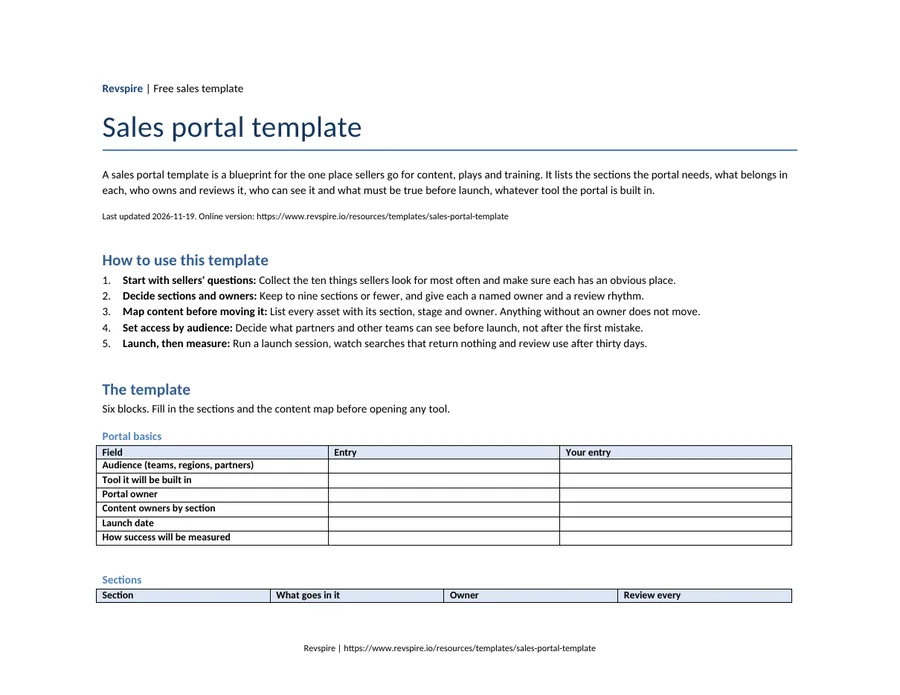
The template
Six blocks. Fill in the sections and the content map before opening any tool.
Portal basics
| Field | Entry |
|---|---|
| Audience (teams, regions, partners) | |
| Tool it will be built in | |
| Portal owner | |
| Content owners by section | |
| Launch date | |
| How success will be measured |
Sections
| Section | What goes in it | Owner | Review every |
|---|---|---|---|
| Home | What is new, most used assets and announcements | ||
| Pitch and product | Current decks, one-pagers and demo material | ||
| By stage of the sale | The assets and plays for each stage | ||
| Competitors | Battlecards and comparison material | ||
| Pricing and proposals | Pricing guidance, approval rules and proposal templates | ||
| Customer proof | Case studies and references by industry | ||
| Playbooks and talk tracks | Plays for common selling situations | ||
| Training and certification | Courses, practice and current certifications | ||
| Partners | What partners may use, if they share the portal |
Content map
| Asset | Section | Stage | Persona | Owner | Review date |
|---|---|---|---|---|---|
Access rules
| Audience | Can see | Cannot see |
|---|---|---|
| Sellers | ||
| Sales engineers | ||
| Customer success | ||
| Partners | ||
| Buyers (through shared links only) |
Tags
| Tag type | Values |
|---|---|
| Stage | |
| Persona | |
| Industry | |
| Product | |
| Competitor | |
| Region or language |
Launch checklist
| Check | Done |
|---|---|
| Every asset has an owner and a review date | |
| Old versions are archived or removed | |
| Search tested with ten real seller questions | |
| Single sign-on works for every audience | |
| Managers briefed before sellers | |
| Launch session held and recorded | |
| A route for feedback and content requests exists |
Prefer a file? We email the Word, Excel and PDF versions to your work address, free.
Email me the filesA worked example
Example: fictional company
From three shared drives to one portal.
Ferncastle Analytics kept sales content on three shared drives owned by marketing, product and the sales team. Before choosing a tool, the enablement lead filled in the template with product marketing. The content map showed that most assets were duplicates or out of date, and the portal launched with far fewer assets than the drives had held.
Ferncastle Analytics: what moved where
| Old location | New section | Decision |
|---|---|---|
| Marketing drive: decks | Pitch and product | Kept the current deck per product; archived older versions |
| Product drive: release notes | Home (what is new) | Linked to the source rather than copied |
| Sales drive: competitor folders | Competitors | Rebuilt as one battlecard per competitor with an owner |
| Sales drive: proposals | Pricing and proposals | One template per package; old proposals removed |
| Email attachments: case studies | Customer proof | Tagged by industry and stage |
Example: fictional company. Ferncastle Analytics, Harborview Metrics, Marlow & Finch Logistics and every person named in this example are invented for illustration. Any resemblance to real companies or people is coincidental.
How to build a sales portal
Start with sellers' questions
Collect the ten things sellers look for most often and make sure each has an obvious place.
Decide sections and owners
Keep to nine sections or fewer, and give each a named owner and a review rhythm.
Map content before moving it
List every asset with its section, stage and owner. Anything without an owner does not move.
Set access by audience
Decide what partners and other teams can see before launch, not after the first mistake.
Launch, then measure
Run a launch session, watch searches that return nothing and review use after thirty days.
Where sales portals go wrong
Moving everything across
Migrating every file recreates the mess in a new tool.
Folders by department
Sellers think in deals and stages, not in who made the file.
No owners
Content without an owner is out of date within a quarter.
One access level
Partners seeing internal pricing guidance is a common and avoidable error.
Launch and leave
A portal needs a monthly review of what is searched for, used and missing.
Looking at tools for this job? We compare the options in our guide to sales portal software.
Where Revspire fits
The template works in any tool, but the owner, version and usage columns are easier to keep true when the portal records them itself. Revspire Content Hub is a governed repository: each asset has an owner and a version, versioning keeps links already sent pointing at the current file, usage is visible by asset, and it syncs both ways with SharePoint and OneDrive.
For the partner section, the Revspire Partner Portal gives channel partners training tracks, role-plays and certifications in one place, alongside the governed content, playbooks and deal rooms each tier should see.
Sales portal template FAQs
What should a sales portal include?
A home page for what is new, pitch and product material, content by stage, competitor battlecards, pricing and proposal guidance, customer proof, playbooks, training and, where relevant, a partner section.
How is a sales portal different from a shared drive?
A portal organises approved content by how sellers work, shows who owns each asset and what is used, and controls access by audience. A shared drive only stores files.
Who should own the sales portal?
Sales enablement usually owns the portal, with product marketing owning most content sections and a named owner for every asset.
What tool should a sales portal be built in?
Fill in the sections, content map and access rules first. They show whether a wiki or intranet is enough or whether you need a sales enablement platform with search, versioning and usage data.
Related templates and reading
- Free templateSales playbook templateA B2B sales playbook outline: ICP, personas, stages with exit criteria, discovery questions, plays for common situations and objection responses.
- Free templateMessaging framework templateA B2B message house: positioning statement, value proposition, three pillars with proof, persona messages and answers to the questions buyers ask.
- Free templateSales one-pager templateA one-page sales sheet in eight blocks, from headline to call to action, with a proof register and product, executive, competitive and industry variants.
- Free templateTalk track templateOpener, discovery questions, value points, objection responses and the close for one type of sales call.
- Listicle: tools to build the portal inBest sales portal software
- Template: decide what moves into the portalSales content audit template
- Template: when partners need their own portalPartner portal requirements checklist
- Template: the buyer-facing room for each dealDigital sales room template